
ftxui::component モジュールは、ユーザーイベント (キーボード、マウスなど) に応答するインタラクティブなコンポーネントを生成するロジックを定義します。
Example セクションには、例のコレクションが記載されています。
ftxui::Appは、コンポーネントを描画するメインループを定義します。
ftxui::Component は ftxui::ComponentBase への共有ポインタです。後者は以下を定義します。
ftxui::ComponentBase::Render(): インターフェースのレンダリング方法。ftxui::ComponentBase::OnEvent(): イベントへの反応方法。ftxui::ComponentBase::Add(): 2つのコンポーネント間の親子関係を構築します。コンポーネントのツリーは、キーボードを使用したナビゲーション方法を定義するために使用されます。
ftxui::Element は単一のフレームをレンダリングするために使用されます。
ftxui::Component は、動的なユーザーインターフェースをレンダリングし、複数のフレームを生成し、イベントに応じてその状態を更新するために使用されます。
複数のコンポーネントのギャラリー。(デモ)
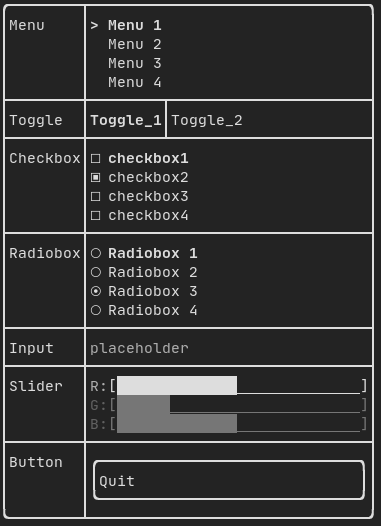
すべての事前定義されたコンポーネントは "ftxui/dom/component.hpp" で利用可能です。
#ifndef FTXUI_COMPONENT_HPP
#define FTXUI_COMPONENT_HPP
#include <functional>
#include <memory>
#include <utility>
struct ButtonOption;
struct CheckboxOption;
struct Event;
struct InputOption;
struct MenuOption;
struct RadioboxOption;
struct MenuEntryOption;
template <class T, class... Args>
std::shared_ptr<T>
Make(Args&&... args) {
return std::make_shared<T>(std::forward<Args>(args)...);
}
}
std::function<void()> on_click,
ButtonOption options = ButtonOption::Simple());
bool* checked,
CheckboxOption options = CheckboxOption::Simple());
StringRef placeholder,
InputOption options = {});
int* selected_,
MenuOption options = MenuOption::Vertical());
int* selected_,
RadioboxOption options = {});
template <typename T>
Slider(SliderOption<uint16_t>);
Slider(SliderOption<uint32_t>);
Slider(SliderOption<uint64_t>);
ConstRef<int> min = 0,
ConstRef<int> max = 100,
ConstRef<int> increment = 5);
ConstRef<float> min = 0.f,
ConstRef<float> max = 100.f,
ConstRef<float> increment = 5.f);
ConstRef<long> min = 0L,
ConstRef<long> max = 100L,
ConstRef<long> increment = 5L);
std::function<void()> on_enter,
std::function<void()> on_leave);
std::function<void(bool)> on_change);
std::function<void()> on_leave);
}
#endif
#define FTXUI_EXPORT(component)
Component Button(ConstStringRef label, std::function< void()> on_click, ButtonOption options=ButtonOption::Simple())
クリックすると関数を実行するボタンを描画します。
Component ResizableSplitTop(Component main, Component back, int *main_size)
マウスで設定可能な、2つのコンポーネント間の垂直分割。
Component Horizontal(Components children, int *selector)
水平方向に左右矢印キーまたは 'h'/'l' キーで操作される、1つずつ 水平に描画されるコンポーネントのリスト。
Component Toggle(ConstStringListRef entries, int *selected)
要素の水平リスト。ユーザーはこれらを操作できます。
FTXUI_EXPORT(COMPONENT) ComponentDecorator Maybe(std Component Modal(Component main, Component modal, const bool *show_modal)
Component Renderer(Component child, std::function< Element()>)
|child| に似た、|render| をComponent::Render()イベントとして 使用する新しいComponentを返します。
Component Hoverable(Component component, bool *hover)
コンポーネントをラップします。マウスでホバーされているかどうかを知る機能を提供します。
Component Checkbox(ConstStringRef label, bool *checked, CheckboxOption options=CheckboxOption::Simple())
チェック可能な要素を描画します。
Component Window(WindowOptions option)
ドラッグ可能/サイズ変更可能なウィンドウ。複数のウィンドウを使用するには、それらを Container::Stacked({...})コンポーネントを使用してスタックする必要があります。
Component Vertical(Components children)
コンポーネントのリスト。垂直方向に1つずつ描画され、上下の矢印キーまたは'j'/'k'キーを使用して垂直方向にナビゲートされます。
Component Maybe(Component child, std::function< bool()> show)
コンポーネント|child|を装飾します。|show|がtrueを返す場合にのみ表示されます。
Component ResizableSplitRight(Component main, Component back, int *main_size)
マウスで設定可能な、2つのコンポーネント間の水平分割。
Component Input(StringRef content, InputOption options={})
テキストを編集するための入力ボックス。
Component Dropdown(ConstStringListRef entries, int *selected)
ドロップダウンメニュー。
Component Stacked(Components children)
互いに重ねて配置されるコンポーネントのリスト。 イベントは最初のコンポーネントに伝播され、処理されなければ次に、 というように伝播していきます。 コンポーネントは、与えられた順序の逆順で描画されます。 ...
Component Radiobox(ConstStringListRef entries, int *selected_, RadioboxOption options={})
一つだけ選択できる要素のリスト。
Component ResizableSplitBottom(Component main, Component back, int *main_size)
マウスで設定可能な、2つのコンポーネント間の垂直分割。
Component Menu(ConstStringListRef entries, int *selected_, MenuOption options=MenuOption::Vertical())
テキストのリスト。フォーカスされた要素が選択されます。
Component ResizableSplitLeft(Component main, Component back, int *main_size)
マウスで設定可能な、2つのコンポーネント間の水平分割。
Component Tab(Components children, int *selector)
一度に1つだけ描画され、操作されるコンポーネントのリスト。 |selector| は選択されたコンポーネントのインデックスを示します。これは タブを実装するのに便利です。
Component MenuEntry(ConstStringRef label, MenuEntryOption options={})
特定のメニューエントリ。Container::Verticalに入れることで メニューを形成できます。
FTXUIのftxui::Container::名前空間
std::shared_ptr< T > Make(Args &&... args)
std::shared_ptr< Node > Element
std::function< Element(Element)> ElementDecorator
std::vector< Component > Components
Component ResizableSplit(ResizableSplitOption options)
2つのコンポーネント間の分割。
Component operator|(Component component, ComponentDecorator decorator)
Component Collapsible(ConstStringRef label, Component child, Ref< bool > show=false)
折りたたみ可能なコンポーネント。矢印付きのチェックボックスを表示します。アクティブ化されると、子が 表示されます。
Component Slider(SliderOption< T > options)
任意の方向のスライダー。
Component & operator|=(Component &component, ComponentDecorator decorator)
std::function< Component(Component)> ComponentDecorator
std::shared_ptr< ComponentBase > Component
Component CatchEvent(Component child, std::function< bool(Event)>)
入力
例:
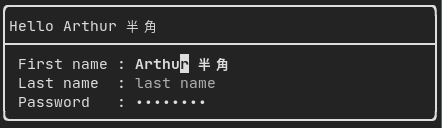
によって生成されます: "ftxui/component/component.hpp" の ftxui::Input()
フィルタ付き入力
ftxui::CatchEvent を使用して、入力コンポーネントによって受信される文字をフィルタリングできます。
std::string phone_number;
Component input = Input(&phone_number, "phone number");
input |= CatchEvent([&](Event event) {
return event.is_character() && !std::isdigit(event.character()[0]);
});
input |= CatchEvent([&](Event event) {
return event.is_character() && phone_number.size() >= 10;
});
メニュー
メニューオブジェクトを定義します。エントリのリストを含み、そのうちの1つが選択されます。
例:

によって生成されます: "ftxui/component/component.hpp" の ftxui::Dropdown()
区切られた中間間隔を持つ範囲で構成されるスライダーオブジェクトを表します。ftxui::Slider() によって作成できます。
特殊な種類のメニューです。エントリは水平方向に表示されます。
例:

Renderer
チェックボックス
このコンポーネントはチェックボックスを定義します。オン/オフを切り替えられる単一のエントリです。
例:
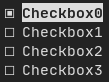
生成元: "ftxui/component/component.hpp"のftxui::Checkbox()
ラジオボックス
ラジオボタンコンポーネントです。これはエントリのリストで、そのうち1つをオンにできます。
例:
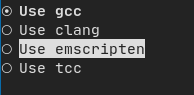
生成元: "ftxui/component/component.hpp"のftxui::Radiobox()
ドロップダウン
ドロップダウンメニューは、開くとユーザーが選択できる要素のリストを表示するコンポーネントです。
例:

生成元: "ftxui/component/component.hpp"のftxui::Dropdown()
スライダー
区分された中間区間を持つ範囲からなるスライダーオブジェクトを表します。ftxui::Slider()で作成できます。
例:
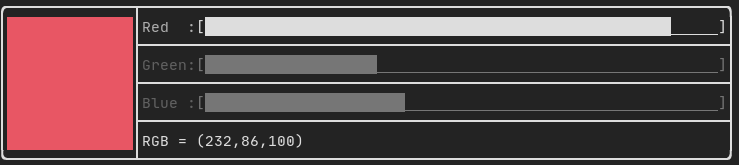
生成元: "ftxui/component/component.hpp"のftxui::Slider()
Renderer
生成元: ftxui/component/component.hpp のftxui::Renderer()。この コンポーネントは、別の関数を使ってインターフェースを描画することで、 別のコンポーネントを装飾します。
例:
auto inner = [...]
auto renderer = Renderer(inner, [&] {
return inner->Render() | border
});
ftxui::Renderer はコンポーネントデコレーターパターンもサポートしています。
auto component = [...]
component = component
| Renderer([](Element e) { return e | border))
| Renderer(bold)
省略記法として、要素デコレーターを使ってコンポーネントを構成することもできます:
auto component = [...]
component = component | border | bold;
CatchEvent
ftxui::CatchEvent() によって生成されます (ftxui/component/component.hpp から)。このコンポーネントは、基になるコンポーネントの前にイベントをキャッチして、他のコンポーネントを装飾します。
例:
auto screen = App::TerminalOutput();
auto renderer = Renderer([] {
return text("My interface");
});
auto component = CatchEvent(renderer, [&](Event event) {
if (event == Event::Character('q')) {
screen.ExitLoopClosure()();
return true;
}
return false;
});
screen.Loop(component);
ftxui::CatchEvent はデコレーターとしても使用できます。
component = component
| CatchEvent(handler_1)
| CatchEvent(handler_2)
| CatchEvent(handler_3)
;
折りたたみ可能
ユーザーが可視性をオン/オフに切り替えることができる視覚要素に役立ちます。本質的に、これは ftxui::Checkbox() と ftxui::Maybe() コンポーネントの組み合わせです。
auto collapsible = Collapsible("Show more", inner_element);
Maybe
ftxui::Maybe() によって生成されます (ftxui/component/component.hpp から)。このコンポーネントは、ブール値または述語を介して他のコンポーネントを表示/非表示するために利用できます。
真偽値を使った例:
bool show = true;
auto component = Renderer([]{ return "Hello World!"; });
auto maybe_component = Maybe(component, &show)
述語を使った例:
auto component = Renderer([]{ return "Hello World!"; });
auto maybe_component = Maybe(component, [&] { return time > 10; })
通常どおり、ftxui::Maybe はデコレーターとしても使用できます。
component = component
| Maybe(&a_boolean)
| Maybe([&] { return time > 10; })
;
コンテナ
水平
"ftxui/component/component.hpp" の ftxui::Container::Horizontal() によって生成されます。コンポーネントのリストを水平に表示し、キーボード/マウスナビゲーションを処理します。
垂直
"ftxui/component/component.hpp" の ftxui::Container::Vertical() によって生成されます。コンポーネントのリストを垂直に表示し、キーボード/マウスナビゲーションを処理します。
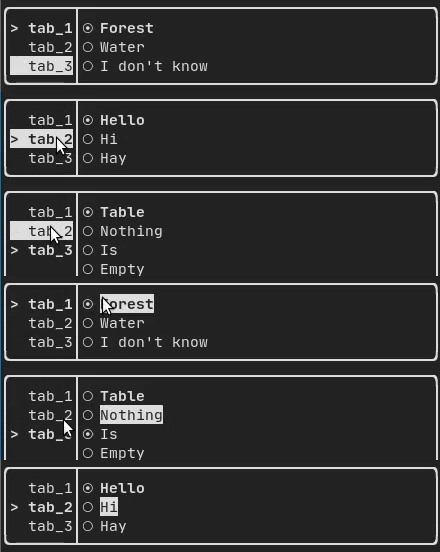
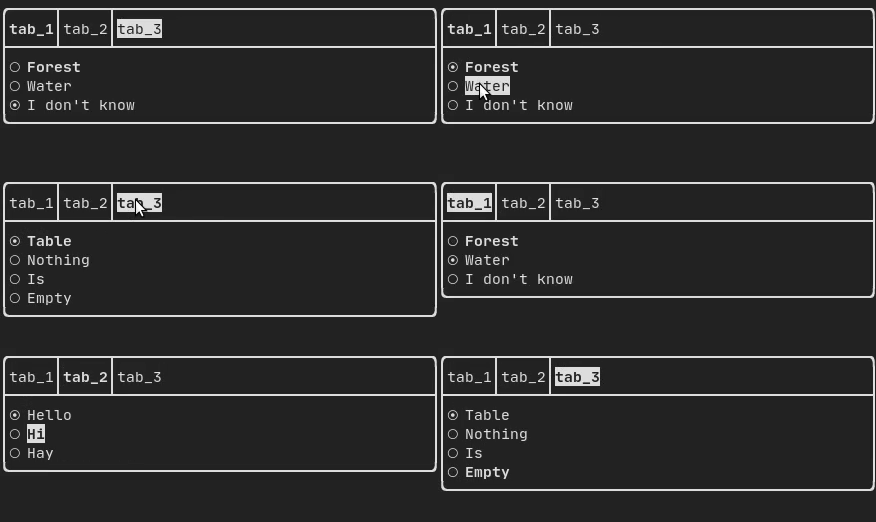
タブ
"ftxui/component/component.hpp" の ftxui::Container::Tab() によって生成されます。コンポーネントのリストを受け取り、そのうちの1つだけを表示します。これはタブバーを実装するのに役立ちます。
垂直:
水平:
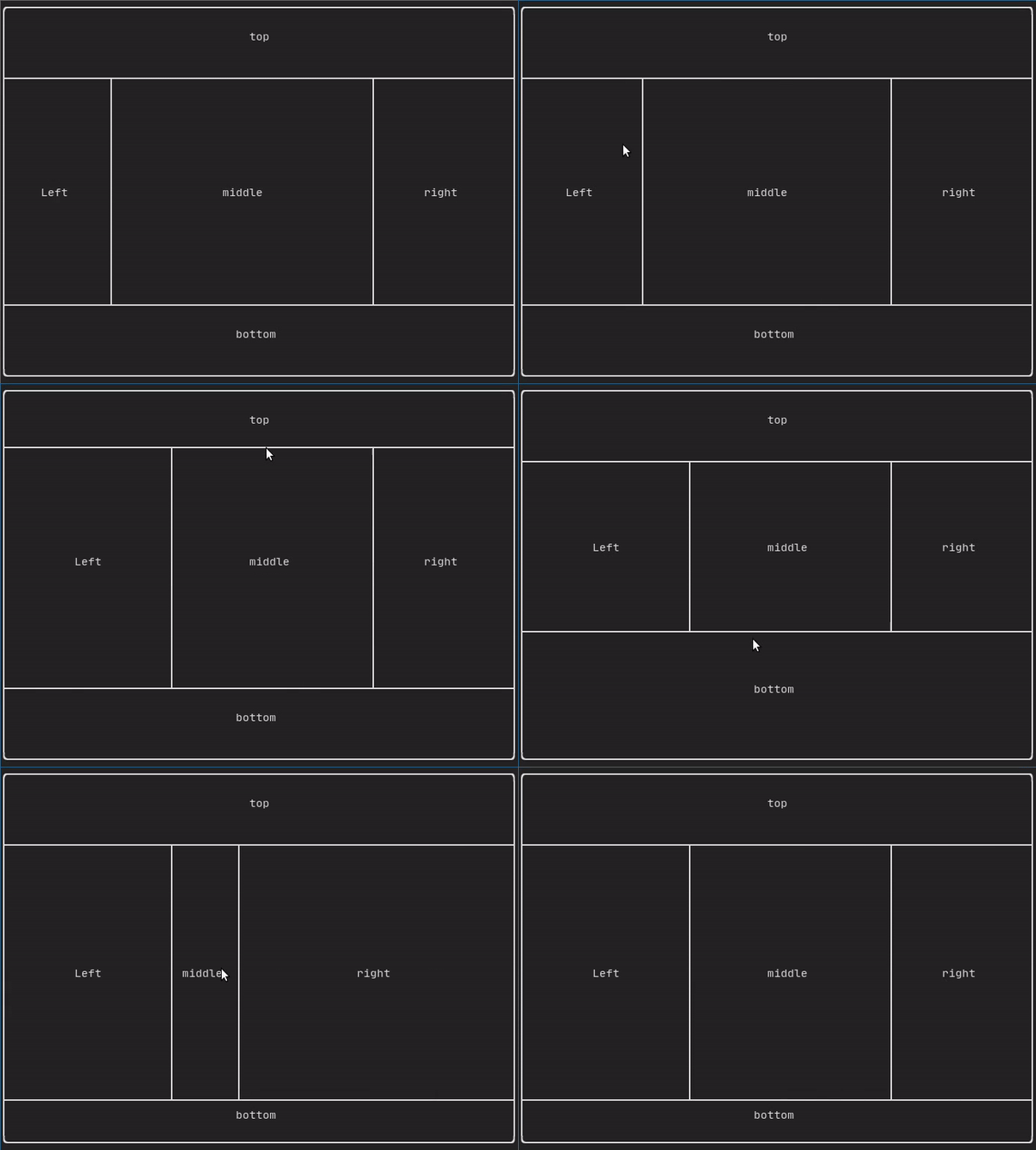
ResizableSplit
2つの子コンポーネント間の水平または垂直の分離を定義します。分割の位置は可変で、マウスで制御できます。 4つの可能な分割があります。
例:
フレームの再描画を強制する
通常、ftxui::App::Loop()は、一連のイベント(キーボード、マウス、 ウィンドウのリサイズなど)が処理されるたびに新しいフレームを描画する 役割を担っています。しかし、FTXUIが知らない任意のイベントに 反応したい場合もあるでしょう。これを実現するには、スレッド経由で ftxui::App::PostEvent(**これはスレッドセーフです**)を使って イベントを投稿する必要があります。イベントftxui::Event::Customを 投稿する必要があります。
例:
screen->PostEvent(Event::Custom);
新しいイベントを処理する必要がない場合は、次のように使用できます:
screen->RequestAnimationFrame();
の代わりに。